
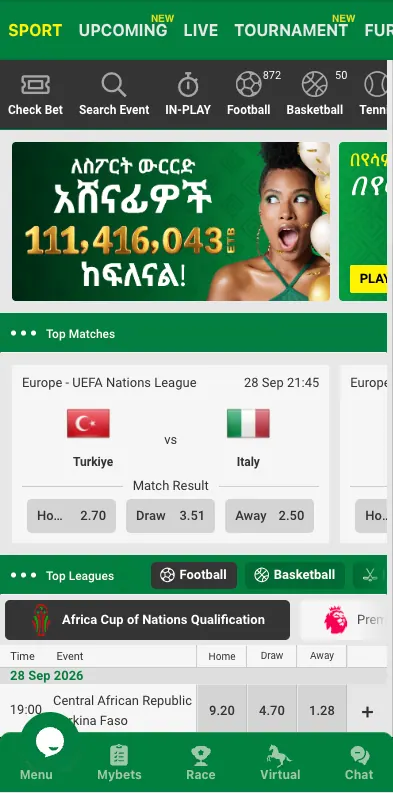
An account is the starting point for anything on Chatki Bet, from placing a first bet to opening the casino lobby. Registration is open to adults of legal age — 18+ in Ethiopia — and each person is expected to hold a single account.
This page covers signing up, logging in, and the account-management questions that come up afterwards: verification, password recovery, and changing details already on file.
18+ · Ethiopia
Registration Methods
| Method | Data required | Confirmation |
|---|---|---|
| Mobile number | Phone number, password, country | SMS verification code |
| Email address, password | Confirmation link or code sent to the inbox |
The exact set of options shown at sign-up can vary by update — the registration screen itself is the current source for what's available at any given time.
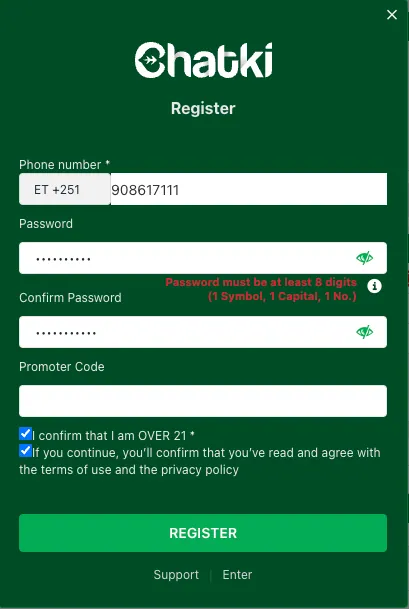
How to Register on Chatki Bet
- Open the registration form from the homepage or the app.
- Choose a registration method — typically mobile number or email.
- Enter the requested details: phone number or email, a password, and country.
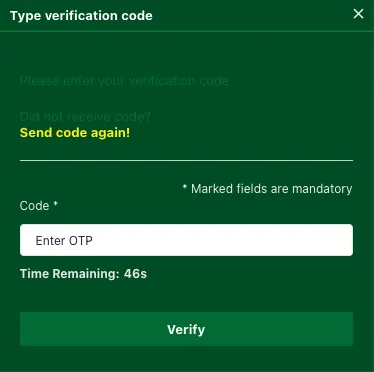
- Submit the form and enter the verification code sent by SMS or email.
- Once verified, the account is active and ready for a first deposit — see Payments for the available methods.
Account Verification (KYC)
Identity verification typically becomes relevant around the first withdrawal, or once account activity crosses a threshold the platform sets. It generally asks for a government-issued ID confirming the name and date of birth on file match the person using the account. Processing time depends on how quickly the documents can be reviewed, and can range from minutes to longer during busy periods. Submitting a clear, unedited photo of the document on the first attempt is generally faster than a low-quality scan that needs to be re-requested.
Logging In
Returning to the account is a matter of entering the registered phone number or email along with the account password. A "remember me" option, where offered, keeps the session active on a trusted device so login isn't required every visit.
Common Login Problems and Fixes
- Wrong password — use the password recovery option rather than repeated guessing, which can temporarily lock the account.
- Unrecognised phone number or email — double-check which method was used at registration; an account created with a phone number won't respond to an email login attempt.
- No verification code arriving — confirm the phone has signal or the email isn't filtering the message to spam, then request a new code rather than reusing an expired one.
Password Recovery
- Select "Forgot password" on the login screen.
- Enter the phone number or email tied to the account.
- Enter the reset code received and choose a new password.
- Log in with the new password once the reset is confirmed.
Managing Account Details
Changing a phone number, email or other personal detail is normally done from an account settings menu once logged in, sometimes with a verification step to confirm the change is genuine. Bet history is kept in the account and can be reviewed at any time from the same menu. Personal data on file — name, date of birth, contact details — generally can't be changed freely once verification is complete, since it needs to keep matching the identity document on record; support is the right place to ask about correcting a genuine error. Keeping the phone number or email on file current also matters practically, since it's how a password reset code or a security alert actually reaches the account holder — an outdated number or inbox can lock someone out of their own account at the exact moment they need access most, such as during a password reset or an urgent account-security check.
Closing an Account or Self-Exclusion
Closing an account, whether temporarily or permanently, is handled through account settings or by contacting support directly — the exact steps depend on whether it's a short pause or a full closure. Anyone wanting to set formal limits or exclude themselves from betting should also see the Responsible Gaming page.
Keeping the Account Secure
A password that isn't reused from another site, combined with never sharing a verification code with anyone claiming to be support, covers most of the security risk on an account. Chatki Bet's own staff won't need the code sent to a phone or email to help with an issue.
Frequently asked questions
How do I register on Chatki Bet?
Open the registration form, choose to sign up with a mobile number or email, enter the requested details, and confirm the verification code sent to that number or inbox.
What is the minimum age to register?
18+, in line with Ethiopia's legal age requirement.
I forgot my Chatki Bet password — what do I do?
Use the "Forgot password" link on the login screen, enter the phone number or email on the account, and follow the reset code to set a new password.
Why isn't my verification code arriving?
Check phone signal or the email spam folder, then request a new code rather than reusing one that may have expired.
Can I have more than one Chatki Bet account?
No — one account per person is standard practice, and multiple accounts can affect eligibility for bonuses and withdrawals.
How do I verify my identity on Chatki Bet?
Verification usually asks for a government-issued ID matching the name on the account, typically requested around the first withdrawal.
How do I change my phone number or email on file?
Account settings, once logged in, normally include an option to update contact details, sometimes with an extra verification step.
How do I close my Chatki Bet account?
Through account settings or by contacting support directly. Anyone looking for formal self-exclusion tools should check the Responsible Gaming page.